Android users need flexible tools to grow audiences and manage content efficiently. Sub4Unlock provides a simple and effective solution by allowing creators to lock links behind social actions. With the Android version, you can create and manage unlock links anytime, directly from your smartphone.
Moreover, downloading Sub4Unlock on Android helps creators stay productive on the go. Whether you manage social media campaigns, promote exclusive content, or grow subscribers, the Android platform gives you fast access without relying on a desktop device.
What is Sub4Unlock for Android?
Sub4Unlock for Android is a mobile-friendly solution that allows users to create, manage, and track sub-to-unlock links. It enables creators to require actions such as subscribing, following, or joining groups before users can access locked content. Once users complete the actions, the system automatically unlocks the link.
In addition, the Android version focuses on usability and performance. It offers a clean interface, fast loading times, and easy navigation. As a result, creators can manage campaigns efficiently, even with limited time or resources.
Why Download Sub4Unlock on Android?
Downloading Sub4Unlock on Android gives you convenience and flexibility. Instead of waiting to access a desktop dashboard, you can monitor link performance, create new unlock links, and adjust settings directly from your phone. This approach saves time and helps you respond quickly to campaign changes.
Furthermore, Android users benefit from real-time updates and notifications. You can instantly track engagement, detect issues, and optimize your links. Consequently, you maintain better control over your growth strategy.
How to Download Sub4Unlock for Android
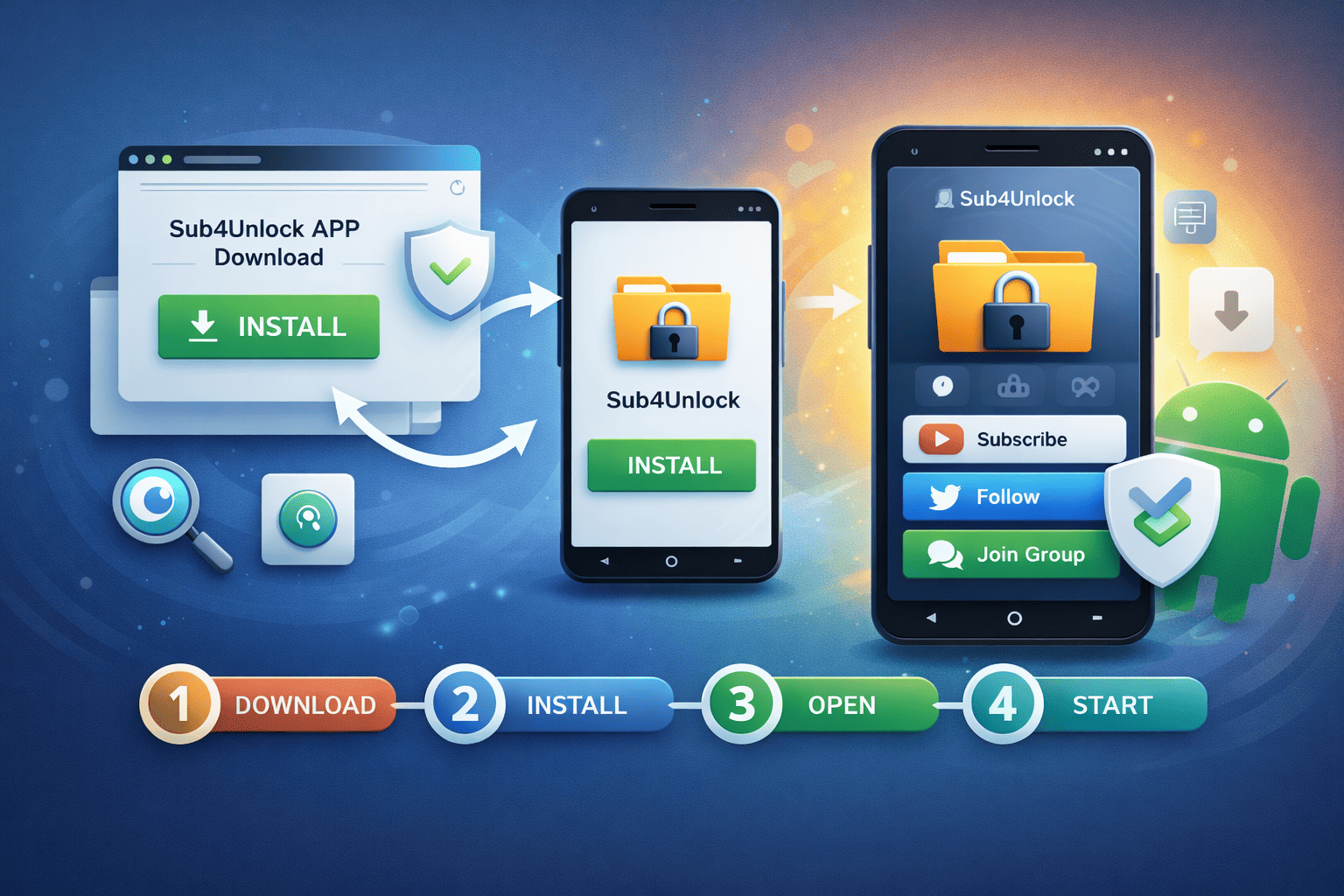
Downloading Sub4Unlock on Android is a straightforward process when you follow the correct steps. By installing the app from a trusted source, you ensure better performance, security, and access to the latest features. The guide below walks you through each stage clearly so you can start creating unlock links without delay.
Step 1: Visit the Official Sub4Unlock Website
First, open your mobile browser and go to the official Sub4Unlock website. This ensures you access the correct version of the app and avoid unofficial or modified files that could cause security issues.
In addition, the official website always provides the most up-to-date download options and installation instructions. By starting here, you reduce the risk of errors and ensure compatibility with your Android device.
Step 2: Choose the Android Download Option
Next, navigate to the Download or Get Started section and select the Android or APK option. This step directs you to the file specifically designed for Android devices.
Moreover, choosing the correct version helps the app run smoothly on your device. It also ensures that all features, including analytics and security tools, function properly after installation.
Step 3: Enable Installation from Trusted Sources
Before installing the APK, Android may ask you to allow installations from trusted sources. Enable this option in your device settings to proceed with the installation.
This step is important because Android blocks unknown installations by default. However, enabling trusted sources temporarily allows you to install Sub4Unlock safely while maintaining overall device security.
Step 4: Install the App on Your Device
Once the download completes, tap the APK file to begin installation. Follow the on-screen instructions until the process finishes.
After installation, Android will automatically add Sub4Unlock to your app list. At this point, the app is ready to launch, and no additional setup is required to open it.
Step 5: Log In and Start Using Sub4Unlock
Finally, open the app and log in using your registered account. New users can quickly create an account by following the registration steps inside the app.
After logging in, you can immediately create unlock links, manage campaigns, and track performance. This setup allows you to start growing your audience directly from your Android device.
Downloading Sub4Unlock for Android gives creators a fast and flexible way to manage unlock links anytime and anywhere. By following these steps carefully, you ensure a secure installation and smooth experience. Once installed, Sub4Unlock becomes a powerful mobile tool to drive engagement, grow subscribers, and control your content effectively.
How to Install and Set Up Sub4Unlock
After installation, open the app and sign in using your registered account. If you are a new user, create an account by following the on-screen instructions. Then, connect your social platforms and configure basic settings.
Next, create your first unlock link by selecting required actions and adding the destination content. Customize the appearance and messaging to match your brand. Finally, save and test the link before sharing it with your audience.
Key Features Sub4Unlock on Android
Sub4Unlock on Android offers a set of features designed specifically for mobile creators. These tools help you manage unlock links efficiently without relying on a desktop device. As a result, you can stay productive and responsive while running campaigns directly from your smartphone.
In addition, the Android version focuses on simplicity and performance. The interface loads quickly, navigation feels intuitive, and essential actions remain accessible with just a few taps. This design ensures you spend more time growing your audience and less time managing technical details.
Core Features You Can Use on Android:
- Easy unlock link creation and management
- Multiple social platform integrations
- Real-time analytics and performance tracking
- Anti-bypass and link protection features
- Mobile-optimized dashboard interface
Together, these features allow creators to run complete Sub4Unlock campaigns directly from their Android devices. You can create links, monitor engagement, and adjust strategies without interruption. Consequently, your workflow becomes faster and more flexible.
Ultimately, Sub4Unlock on Android empowers creators to maintain consistent growth wherever they are. By combining ease of use with powerful functionality, the platform delivers a reliable solution for mobile-first content creators who value efficiency and control.
Sub4Unlock Download for Android offers creators a fast, secure, and flexible way to grow their audience. By managing unlock links directly from your phone, you gain efficiency and control without sacrificing performance. With proper setup and optimization, Sub4Unlock becomes a powerful tool for mobile-first content creators.
Frequently Asked Questions (FAQ)
1. How does Sub4Unlock work?
Sub4Unlock works by locking a link or content behind required actions such as subscribing, following, or joining a group. Once users complete all required actions, the system automatically unlocks the link and grants access to the content.
2. Is there a limit to generating links?
No, there is no limit to link generation. You can create as many Sub4Unlock links as you need without any restrictions. This allows creators to manage multiple campaigns and content types easily.
3. What if you forget or lose your shortened link?
If you are a registered user, you don’t need to worry about losing your shortened links. You can log in to your dashboard at any time to view, manage, and recover all links associated with your account.
4. Does Sub4Unlock follow community rules?
Yes, Sub4Unlock follows platform and community guidelines. Users must comply with social media rules and content policies when creating unlock links to ensure safe and fair usage for everyone.
5. What happens if users use adult-type links?
Adult-type links are not allowed on Sub4Unlock. If such links are detected, they will be blocked, and the associated channel or content will be removed from the system to maintain a safe platform.