Sub 4 Unlock APK helps creators control access to their content while increasing engagement across social platforms. With this Android-based solution, you can create unlock links, require specific actions, and manage campaigns directly from your mobile device. This user manual explains how to use Sub 4 Unlock APK step by step.
By following this guide, you will understand how to install the app, configure settings, create unlock links, and troubleshoot common issues. Whether you are a beginner or an experienced creator, this manual helps you use Sub 4 Unlock APK effectively.
Getting Started with Sub 4 Unlock APK
Before using Sub 4 Unlock APK, users should prepare their Android device properly. Make sure your device runs a compatible Android version and has a stable internet connection. These basic requirements help ensure smooth installation and reliable app performance from the start.
Next, allow installations from trusted sources in your device settings. Since Sub 4 Unlock APK is installed outside of the Google Play Store, Android requires this permission to proceed. Enabling this option temporarily allows you to install the app safely without affecting overall device security.
After installation, open the app and sign in using your registered account. New users can create an account directly within the app by following the on-screen instructions. This step connects your device to the Sub 4 Unlock platform and unlocks access to all features.
Once logged in, take a moment to explore the dashboard and basic settings. Familiarizing yourself with the interface helps you navigate faster and avoid mistakes. By understanding the layout early, you can start creating and managing unlock links with confidence.
Understanding the Dashboard
The dashboard acts as the control center of Sub 4 Unlock APK. From here, you can create new unlock links, view existing links, and monitor performance metrics.
In addition, the dashboard provides quick access to analytics, settings, and security options. Its mobile-friendly layout allows you to navigate easily with minimal taps.
How to Create an Unlock Link
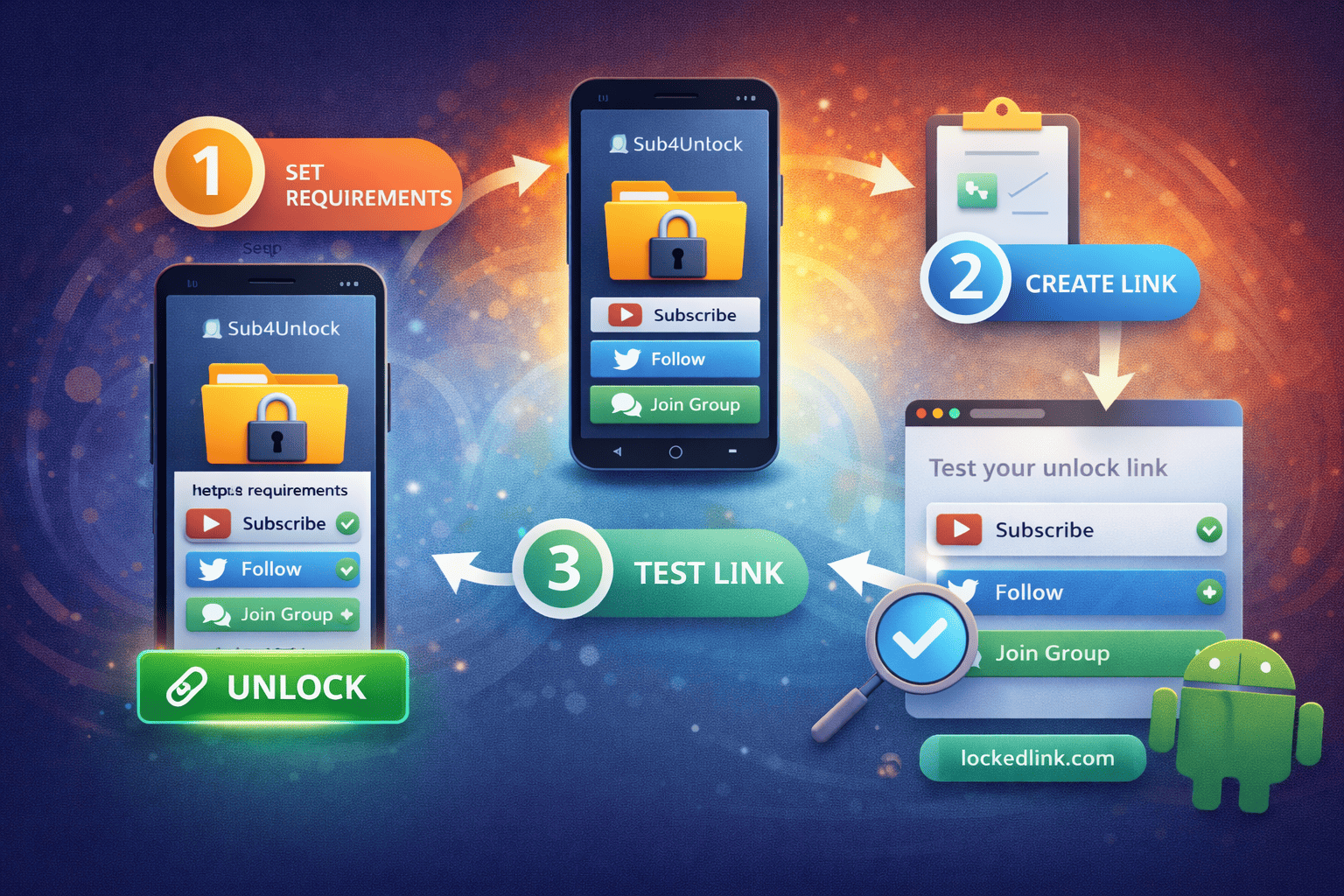
Creating an unlock link in Sub 4 Unlock APK is a simple process when you follow each step carefully. By setting clear requirements and testing your link properly, you can ensure users unlock your content smoothly while you gain meaningful engagement.
1. Start a New Unlock Link
First, open the Sub 4 Unlock APK and go to the dashboard. Tap the Create Link button to begin creating a new unlock link. This action opens the setup page where you define how your content will be locked.
At this stage, you should choose the type of content you want to protect. This may include a URL, downloadable file, or private message. Selecting the correct content type ensures users receive the right reward after unlocking.
2. Define the Required Actions
Next, select the actions users must complete to unlock the content. These actions may include subscribing to a channel, following a social account, or joining a group.
It is important to choose actions that align with your goals. Limiting the number of required actions helps reduce friction and increases the likelihood that users complete the process successfully.
3. Customize Link Details and Appearance
After setting the actions, customize the link title and description. Clear and benefit-focused text helps users understand what they will receive after unlocking.
You can also adjust visual elements such as layout or call-to-action text. These customizations improve user experience and make the unlock page more appealing.
4. Save and Test the Unlock Link
Once everything is set, save the unlock link. Before sharing it publicly, test the link using a different browser or account.
Testing ensures that all actions verify correctly and the content unlocks as expected. This step helps you avoid user complaints and technical issues later.
Creating an unlock link in Sub 4 Unlock APK becomes easy when you follow a structured process. By defining actions clearly, customizing your message, and testing thoroughly, you build unlock links that perform reliably. This approach helps you grow engagement while delivering a smooth experience to your audience.
Tracking Performance and Analytics
Tracking performance and analytics helps you understand how well your unlock links perform. By reviewing data regularly, you can see how many users view your links, complete required actions, and successfully unlock content. These insights allow you to measure the effectiveness of each campaign.
First, use the analytics dashboard to monitor key metrics such as clicks, action completions, and unlock rates. These numbers show how users interact with your links at each stage of the process. When you spot trends early, you can respond quickly and improve results.
Next, compare performance across different unlock links. This comparison helps you identify which actions, rewards, or platforms generate the best engagement. As a result, you can focus your efforts on strategies that deliver consistent growth.
Finally, use analytics data to optimize future campaigns. If completion rates drop, adjust required actions or improve your messaging. By making data-driven decisions, you turn analytics into a powerful tool for long-term success.
Editing and Deleting Unlock Links
You can edit existing unlock links directly from the dashboard. This allows you to update required actions, change destination links, or adjust settings.
If a campaign ends or becomes inactive, you can delete the link to prevent further access. Managing links regularly keeps your dashboard organized.
Sub 4 Unlock APK provides creators with a powerful mobile solution for content locking and audience growth. By understanding its features and following this user manual, you can create effective unlock campaigns with confidence.
When used correctly, Sub 4 Unlock APK helps you protect content, increase engagement, and manage campaigns efficiently from your Android device.
Frequently Asked Questions (FAQ)
1. How does Sub4Unlock work?
Sub4Unlock works by locking a link or content behind required actions such as subscribing, following, or joining a group. Once users complete all required actions, the system automatically unlocks the link and grants access to the content.
2. Is there a limit to generating links?
No, there is no limit to link generation. You can create as many Sub4Unlock links as you need without any restrictions. This allows creators to manage multiple campaigns and content types easily.
3. What if you forget or lose your shortened link?
If you are a registered user, you don’t need to worry about losing your shortened links. You can log in to your dashboard at any time to view, manage, and recover all links associated with your account.
4. Does Sub4Unlock follow community rules?
Yes, Sub4Unlock follows platform and community guidelines. Users must comply with social media rules and content policies when creating unlock links to ensure safe and fair usage for everyone.
5. What happens if users use adult-type links?
Adult-type links are not allowed on Sub4Unlock. If such links are detected, they will be blocked, and the associated channel or content will be removed from the system to maintain a safe platform.